Hiển thị các bài đăng có nhãn key. Hiển thị tất cả bài đăng

Thứ Năm, 20 tháng 9, 2012

USB Disk Security 6.1.0.432 + Crack, Key

Ổ đĩa USB đã trở thành một vật dụng khá quen thuộc và hữu ích với người sử dụng máy tính . Song việc sao chép dữ liệu giữa nhiều máy tính, ổ USB thường mang lại những nguy cơ lây nhiễm virut, spyware rất lớn...Download
USB Disk Security sẽ giúp bạn ngăn chặn mối nguy cơ đó. Với sự kết hợp nhiều công cụ mạnh mẽ bao gồm USBShield, USBScan, MemoryShield, Qurantine, giúp bạn yên tâm hơn khi sử dụng thường xuyên sử dụng USB để chia sẻ dữ liệu.
Lợi ích và tính năng

- Chặn các mối đe dọa đã biết và chưa biết từ các thiết bị lưu trữ di động

- Giải pháp tốt nhất để bảo vệ máy tính offline

- Ngăn chặn người dùng trái phép đánh cắp dữ liệu của bạn

- Tương thích với phần mềm bảo mật khác

- Tương thích với tất cả các nền tảng Windows phổ biến

- Nhanh và nhẹ nhất trong các phần mềm bảo mật
 
Download về, giải nén, chạy file setup để cài đặt phần mềm vào máy, sau khi cài đặt, mở phần mềm lên, nhấn vào nút Activate Product
 

Nhập key nằm trong file Serial trong thư mục vừa download vào và nhấn vào nút Register
 

Ngay lập tức bạn sẽ thấy phần mềm đã được kích hoạt đầy đủ
 

Lưu ý: Các key này chỉ kích hoạt được đối với file cài đặt đã crack được kèm theo trong thư mục download về
Tags:USB Disk Security 6.1.0.432,Crack, Key

Thứ Sáu, 14 tháng 9, 2012

Visual Studio 2010 Ultimate


Visual Studio 2012 Ultimate


Throughout the last few weeks, I’ve been doing a lot of reading and talking to people to find out what they like about Visual Studio 2010 and what incentive there is to upgrade to it. I spent a small amount of time with the pre-release versions (but only for basic work), and I did not see the huge differences. But after closer investigation, Visual Studio 2010 does indeed look like a worthwhile upgrade.

One of the first things to note is that Visual Studio 2010 allows you to write code against multiple versions of the .NET Framework and CLR; this means that, even if you still need to work on .NET 3.X or 2.0 code, you can upgrade from Visual Studio 2008 to Visual Studio 2010 and still be able to work on .NET 3.X applications and .NET 2.0 applications.

Some of the features in Visual Studio 2010 and .NET 4 that look really useful are:

IntelliTrace, which allows you to “rewind” the application to debug
Multiple monitor support (it’s about time)
Vastly improved debugging for parallelism
Significantly improved support for XAML
Better support for jQuery and other client-side technologies
Local Team Foundation Server installations (this is awesome for lone developers or developers in small shops)
Parallel Extensions Library
F# built into the system
One person I talked to is Brian Hitney, a Microsoft Developer Evangelist who mainly works with ASP.NET. He told me that it is much more pleasant to work in ASP.NET in Visual Studio 2010. Something he said that stuck out is, “you don’t feel like you’re fighting the system.” One reason why I never really liked ASP.NET much is that it always felt like I was fighting the system to do what I wanted it to do. Brian pointed out that in ASP.NET 4, you can finally control the IDs that WebControls get, and the web.config files are much smaller and manageable now.

Another person I spoke with is Tim Huckaby, an MVP and the CEO of InterKnowlogy, a company that specializes in WPF applications. He had some interesting insights to share, since his perspective is that of someone who is using cutting edge technologies in real-world scenarios. He drove home that the WPF and Silverlight story is totally changed now; there is substantially less need for Blend, and you can do applications that use the basics of XAML without Blend at all (Visual Studio 2008 supported XAML, but did not have a good visual designer).

In addition, Visual Studio 2010 ships with the Metro theme, which is what Windows Phone 7 uses. This means that you can start writing apps today that will look like apps will look on Windows Phone 7; this is great news if you are planning on supporting Windows Phone 7 when it releases. He also stated that it is much easier to work with WCF.

Tim mentioned that Visual Studio 2010 is much, much better at working with SharePoint; in fact, there is no longer a separate SharePoint development tool. While I have never worked with SharePoint on the development side, I’ve noticed that SharePoint development has quietly become a huge market in the last few years.

Visual Studio is also the first version to ship since ASP.NET MVC, ADO.NET Data Services (aka OData), Silverlight, and a whole host of other technologies have been released. In the past, support for these other technologies was spotty, in CTP status, or non-existent; now, Visual Studio supports them. If you pay attention to Microsoft’s releases, they tend to follow a pattern of “revolution” followed by “consolidation of gains.” For example, Windows Vista changed the playing field with Aero, WPF, UAC, and a lot of other new technologies. Windows 7 refined Windows Vista and made it useful and usable. In the same vein, I always felt that some of the new technologies in Windows Vista, .NET 3.X, and Visual Studio 2008 were not well supported, implemented, or documented. Well, now it seems to be there, and properly too.

Another important note is that there is no longer the division of Visual Studio into Team editions; there is simply the Ultimate Edition, which combines all of the functionality that the Team editions had into one package. Speaking of editions, Microsoft is still offering Express editions for folks looking to experiment for free with .NET.

Summary

I think that Visual Studio 2010 has something to offer for everyone. While I have not tried out every single one of its new features, I have switched to it since it RTMed, and it has been a joy. Despite the change to using a fully WPF UI, it still feels very familiar. Other than some changes when I upgraded from the June 2008 CTP of Parallel Extensions to the version released in .NET 4 (I just needed to change a using statement and one class name), I have not had any issues transitioning a decent-sized project from .NET 3.5 to .NET 4.

I look forward to working with Visual Studio 2010; it feels like Microsoft is finally giving us the proper support for technologies that were released years ago. Take it for a test drive by downloading the Visual Studio 2010 trial versions today!

J.Ja

Disclosure of Justin’s industry affiliations: Justin James has a contract with Spiceworks to write product buying guides; he has a contract with OpenAmplify, which is owned by Hapax, to write a series of blogs, tutorials, and articles; and he has a contract with OutSystems to write articles, sample code, etc.


Link download 

http://adf.ly/CqJxl


Tags:Visual Studio 2010,Ultimate,key,crack

Thứ Ba, 28 tháng 8, 2012

Adobe Illustrator CS5 Full Keygen + Hướng dẫn crack


Adobe Illustrator CS5 Full + Keygen + Hướng dẫn crack


Đầu tiên các bạn vào trang chủ tải bản trial bình thường tốc độ khá nhanh
Nếu không tải được thì bạn nên đăng lý tài khoản rồi thử lại

https://www.adobe.com/cfusion/tdrc/i...ct=illustrator


Cách cài đặt:
Lúc cài các bạn chọn dùng thử 30 ngày
Cài xong tải file Keygen về
Chọn Illustrator CS5 --> Điền tên vào ô Name--> Bấm vào chữ "Batch host File" Cuối cùng mở AI lên và điền số serial vào.

Download Keygen: Tại đây
Hướng dẫn Download nhanh: Chọn "download on low speed" --> "Install and download file for free! (speed ~ 100 Kbs)"

Hướng dẫn cách cài đặt và crack:


1. Giải nén file tải về.


2. Sau đó mở file Set-Up.exe.


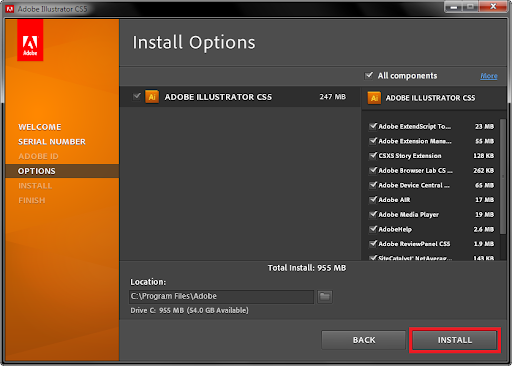
3. Bắt đầu cài đặt


4.Click vào Accept khi màn hình cài đặt hiện lên
.


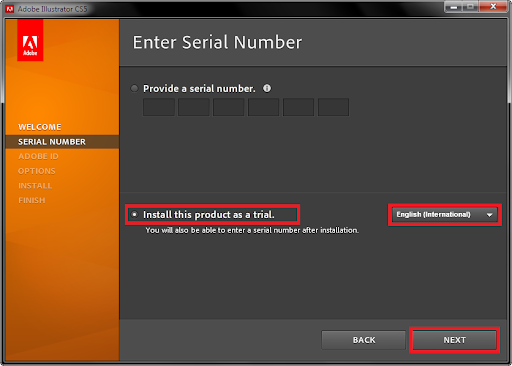
5. Chọn 'Install this product as a trial'. Chọn ngôn ngữ và click Next. 


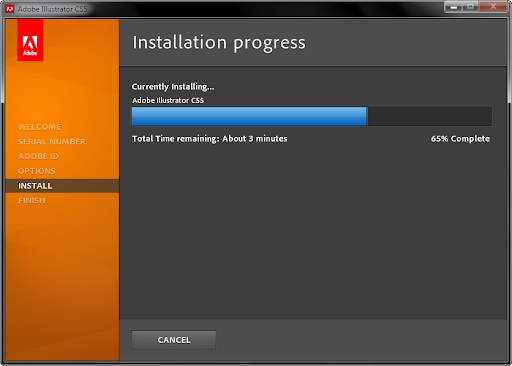
6. Chương trình sẽ cài đặt và đợi tới khi hoàn thành


7. Nếu chương trình đề nghị đóng các trình duyệt và yahoo thì đóng tất cả lại, sau đó nhân Continue để cài đặt tiếp


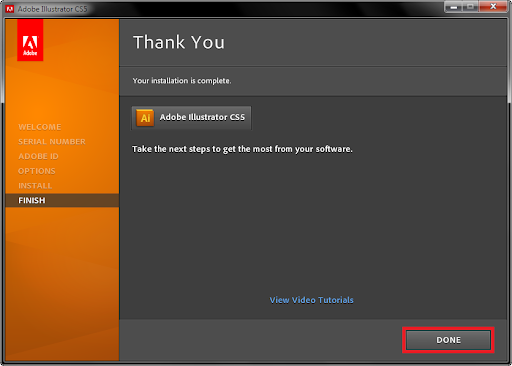
8.Click Done


9. Mở Keygen.exe và Click Patch Hosts File.


10. Chọn Adobe Master Collection CS5 từ chương trình keygen và đánh tên bất kỳ(nhớ đánh không dấu nhiều hơn 4 ký tự) . Sau đó copy serial (Ctrl+C).


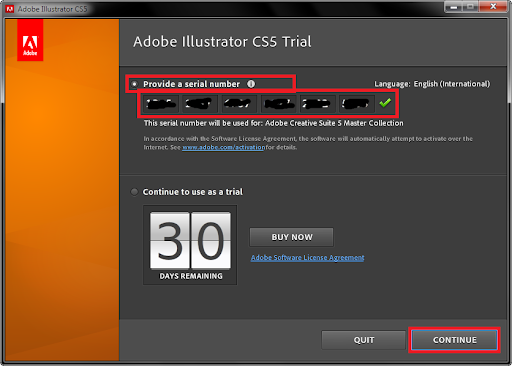
11. Tiếp tục mở Illustrator vừa cài đặt, chương trình sẽ đề nghị điền serial. Chọn Provide a serial number và dán serial bạn vừa copy bên trên Nếu đúng click vào continue


12. Bây giờ bạn có thể sử dụng rồi.


Nếu các bạn điền key bị lỗi thì làm các bước sau:


1. Mở nottpad.


2. Sau đó chọn File -> chọn Open và dán đường dẫn sau: C:\WINDOWS\System32\drivers\etc\hosts và click open Hoặc có thể vào ổ C theo đường dẫn đó và mở với nottpad


3. Và copy dán xuống dưới cùng dòng này


127.0.0.1 activate.adobe.com


4. Sau đó save lại và active lại 1 lần nữa


Nếu các bạn gặp vẫn lỗi INVALID SERIAL NUMBER PROBLEM


Thì làm theo hướng dẫn dưới đây. Có thể làm luôn sau khi cài, khỏi phải nhập key gì cả.


Tải file amtlib.dll rồi copy dán đè vào file amtlib.dll ở đường dẫn sau C:\Program Files\Adobe\Adobe Illustrator CS5\Support Files\Contents\Windows

Tải file amtlib.dll tại đây dành cho bản 32 bit:
http://adf.ly/CKNDn


Download Crack 64-bit
Free File Hosting, Online Storage &amp File Upload with FileServe

Tags:Adobe Illustrator CS5,Full Keygen,Hướng dẫn crack,crack,key,download

Chủ Nhật, 26 tháng 8, 2012

Total Uninstall Professional 6.2.0 - Trình gỡ bỏ ứng dụng số 1 thế giới


Total Uninstall - Một công cụ giám sát và gỡ bỏ ứng dụng mạnh mẽ có thể nói ko có trình nào qua mặt nổi. Nó là ứng dụng hoàn hảo có thể thay thế hoàn toàn Windows Add Remove Programs trong việc gỡ bỏ ứng dụng sạch sẽ & không còn dấu vết. Total Uninstall làm việc theo 2 chế độ: "Chụp" lại toàn bộ tình trạng máy tính trước khi có ứng dụng được cài đặt. Rồi "chụp" lại lần nữa toàn bọ hệ thống sau khi cài đặt - Tiếp theo so sánh 2 tình trạng hệ thống - liệt kê đầy đủ, chi tiết những khóa registry được thêm/thay đổi/xóa theo sơ đồ cây. Làm như vậy rất đơn giản cho quá trình gỡ bỏ ứng dụng - Nó sẽ gỡ bỏ hoàn toàn, sạch sẽ như bản chụp hệ thống đầu tiên. 
  • Với module Installed Applications: Liệt kê, phân tích toàn bộ những ứng dụng được cài đặt trong hệ thống rồi thực hiện gỡ bỏ mà ko cần sự giúp đỡ của Windows Add Remove Programs.
  • Với module Monitored Applications: Module này giúp bạn xem xét tất cả thay đổi với hệ thống của bạn trong quá trình cài đặt ứng dụng.


Tính năng chính:
  • Giám sát các thay đổi từ registry và hệ thống tập tin khi tiến hành cài đặt ứng dụng mới
  • Phân tích chính xác các ứng dụng cài đặt hiện thời và tạo ghi nhận các thay đổi trong quá trình cài đặt
  • Tháo bỏ hoàn toàn các ứng dụng được giám sát hay phân tích
  • Liệt kê mà không bị gián đoạn các ứng dụng cài đặt hay được giám sát với biểu tượng tượng tương ứng
  • Tổ chức theo nhóm các ứng dụng được cài và được giám sát
  • Tìm kiếm ứng dụng để tháo bỏ theo từ khóa nhanh chóng và dễ dàng
  • Các thông tin tóm lược và chi tiết cho mỗi chương trình cài đặt và được giám sát.
  • Các chế độ xem tùy biến cho các thay đổi nhận diện được
  • Ghi nhận tháo bỏ chi tiết
  • Chức năng tìm kiếm mạnh mẽ trong các thay đổi ghi nhận được
  • Chương trình độc lập và sử dụng ít tài nguyên để thông báo các ứng dụng cài đặt đang chạy
  • Xuất các thay đổi registry cho các quá trình cài đặt hay tháo bỏ
  • Xuất danh sách các ứng dụng cài đặt hay được giám sát ra tập tin
  • Xuất ra tập tin hay in các thay đổi ghi nhận được
  • Xem và thực thi các tác vụ đổi tên tập tin mà không cần khởi động lại máy
  • Giao diện đa ngôn ngữ


Yêu cầu:

Windows Vista, Windows XP, Windows 7, Windows 2003, Windows 2000 (32/64-bit)

Giao diện:

Changelog:
Homepage –Download:Hướng dẫn:

1. Cài đặt Total Uninstall 6.2.0
2. Ngắt mạng - active bằng key sau:
3F300WJ-OP14F01-MB3MDQU7-KD6EHYYI-2A7SXP6U-6UUMLHT4-RYYC2AQU-HLBKWRFH-BWYAS7SF-5YFUCESW-W6ULTJDF-AIKQBKBN-CARRBUON-25M2WWEB-CV3CXHYE-OZ35UGBD
Hoặc
655B0WI-OP14F01-JB7LCVYS-7AWBVCEI-VUJBJAN4-YRTZGZLS-DEYC2AQV-ACGG3C4P-W4FLC7O4-INGCQPX4-USX7CQ3V-SMBBIBZV-5VCRXVJP-L6BAXAUC-MVI6DAZQ-QF2FYGPF
.
3. Dùng firewall block file "Tu.exe" và "TuAgent.exe" 
4. Mở mạng lên và xài bình thường


Tags:Total Uninstall Professional 6.2.0,Trình,gỡ bỏ,ứng dụng,số 1,thế giới,key,download